
Debian Patchmanagement
Selbst gebautes Patchmanagement mit Weboberfläche für eine ganze Debian-Serverlandschaft – per SSH, PostgreSQL und PHP.
Ziel ist es ein einfaches Patchmanagement mit Webinterface für eine Anzahl von Debian Servern zu schaffen.
Voraussetzungen
Ein Debian Server mit folgenden Paketen:
apache2, php, postgresql-server, php-pgsql, openssh-server, sshpass, sudo
Installation des Management-Servers
- Erzeugen eines RSA-Schlüssel
ssh-keygen - Erweitern der
/etc/ssh/ssh_configmit dem Wert „StrictHostKeyChecking no“ - anpassen der sudoers für www-data:
# User privilege specification
root    ALL=(ALL:ALL) ALL
www-data ALL=(ALL) NOPASSWD: ALL
- anlegen eines Verzeichnisses für das Web-Frontend:
mkdir /var/www/html/patch - PostgreSQL erlauben, Verbindungen aus dem internen Netz anzunehmen —
in
/etc/postgresql/11/main/postgresql.conf:
listen_addresses = '*'
und in /etc/postgresql/11/main/pg_hba.conf:
# IPv4 local connections:
 host all all 192.168.66.1/24 password
- PostgreSQL neu starten und Datenbank samt Benutzer anlegen:
/etc/init.d/postgresql restart
psql -U postgres -c "create database apt"
psql -d apt -U postgres -c "CREATE USER apt WITH PASSWORD 'apt123';"
- Tabelle anlegen (
psql -d apt -U postgres):
CREATE TABLE IF NOT EXISTS zustand (
    id SERIAL PRIMARY KEY,
    server VARCHAR(15) NOT NULL,
    sys VARCHAR(255) NOT NULL,
    pu VARCHAR(3) NOT NULL,
    ul TEXT,
    root_free VARCHAR(10) NOT NULL,
    last_run TIMESTAMP NOT NULL
);
Web-Frontend
Die Startseite /var/www/html/patch/index.php:
<!DOCTYPE html>
<html lang="en">

<head>
<meta charset="UTF-8">
<meta name="viewport" content="width=device-width, initial-scale=1.0">
<title>Server Information</title>
<style>
body {
background-color: #0e0e0e;
color: #ffffff;
font-family: 'Segoe UI', Tahoma, Geneva, Verdana, sans-serif;
margin: 0;
padding: 0;
box-sizing: border-box;
overflow-x: hidden;
}

.container {
width: 100%;
margin: 50px 0;
overflow-x: auto;
}

table {
width: 100%;
border-collapse: collapse;
margin-top: 20px;
background-color: #1e1e1e;
box-shadow: 0px 0px 20px rgba(0, 0, 0, 0.5);
border-radius: 12px;
overflow: hidden;
}

th,
td {
border: 1px solid #333;
padding: 16px;
text-align: left;
transition: background-color 0.3s ease;
}

th {
background-color: #4CAF50;
color: white;
}

textarea {
width: 100%;
height: 6em;
resize: vertical;
background-color: #333;
color: #ffffff;
border: 1px solid #666;
padding: 12px;
border-radius: 6px;
}

.action-button {
background-color: #3498db;
color: #ffffff;
padding: 12px 20px;
border: none;
border-radius: 8px;
cursor: pointer;
transition: background-color 0.3s ease;
}

.action-button:hover {
background-color: #2980b9;
}

.connected {
color: #3498db;
}

.highlight-row {
background-color: #2ecc71;
color: #ffffff;
}
</style>
</head>

<body>

<div class="container">
<h2 style="text-align: center;">Server Information</h2>
<table>
<thead>
<tr>
<th>Server</th>
<th>Debian Version</th>
<th>Updates Possible</th>
<th style="width: 100%;">Update List</th>
<th>Root Free</th>
<th>Last Run</th>
<th>Action</th>
</tr>
</thead>
<tbody>
<?php
// PostgreSQL Credentials
$host = "192.168.66.31";
$user = "postgres";
$password = "postgres";
$database = "apt";

// Verbindung zur Datenbank herstellen
$conn = new PDO("pgsql:host=$host;dbname=$database;user=$user;password=$password");

// SQL-Abfrage
//$query = "SELECT * FROM zustand ORDER BY server";
$query = "SELECT * FROM zustand ORDER BY (split_part(server, '.', 4)::int)";
$result = $conn->query($query);

if ($result) {
foreach ($result as $row) {
$name = $row['server'];
$version = $row['sys'];
$updates = $row['pu'];
$updateList = $row['ul'];
$rootFree = $row['root_free'];
$lastRun = $row['last_run'];
$ip = $row['ip'];

// Prüfe, ob die IP in der idlist.log vorhanden ist
$IPC = shell_exec("cat /var/www/html/patch/idlist.log | grep $name | wc -l");

// $isIPConnected = in_array($ip, file('/var/www/html/patch/idlist.log;

// Bestimme den Inhalt der Action-Spalte basierend auf der IP-Verbindung
if ($IPC != 0 AND $updates != 0) {
$action = '<span class="connected">✔ ssh connected</span><p><button class="action-button" onclick="openUpdatePage(\'' . $name . '\', \'' . $name . '\')">Server Update</button>';
}
if ($IPC != 0 AND $updates == 0) {
$action = '<span class="connected">✔ ssh connected</span>';
}
if ($IPC == 0) {
$action = '<button class="action-button" onclick="openSSHPage(\'' . $name . '\', \'' . $name . '\')">connect SSH</button>';
}

// Füge eine Klasse für die Hervorhebung hinzu, wenn "Updates Possible" größer als 0 ist
$rowClass = ($updates > 0) ? 'highlight-row' : '';

echo "<tr class='$rowClass'>";
echo "<td>$name</td>";
echo "<td>$version</td>";
echo "<td>$updates</td>";

// Wenn "Updates Possible" größer als 0 ist, zeige die Textarea
if ($updates > 0) {
echo "<td><textarea rows='6' readonly>$updateList</textarea></td>";
} else {
echo "<td>$updateList</td>";
}

echo "<td>$rootFree</td>";
echo "<td>$lastRun</td>";
echo "<td>$action</td>";
echo "</tr>";
}
} else {
echo "<tr><td colspan='7'>Error fetching data.</td></tr>";
}

$conn = null; // Verbindung schließen
?>
</tbody>
</table>
</div>

<script>
function openUpdatePage(serverName, serverIP) {
window.open('supdate.php?ip=' + serverIP, '_blank');
}
function openSSHPage(serverName, serverIP) {
window.open('sid.php?ip=' + serverIP, '_blank');
}

</script>

</body>

</html>
Hilfsskripte
Import der SSH-Keys, /var/www/html/patch/imp.sh:
ip=`/bin/cat /var/www/html/patch/simp.tmp`
sshpass -p "ROOTPASSWORT" ssh-copy-id -i /root/.ssh/id_rsa.pub root@$ip
PHP-Übergabe für den Key-Import, /var/www/html/patch/sid.php:
<?php $ip=$_GET[ip];
shell_exec("sudo echo $ip > /var/www/html/patch/simp.tmp");
$d=shell_exec("sudo /var/www/html/patch/imp.sh");
shell_exec("sudo echo $ip >> /var/www/html/patch/idlist.log");
echo "$d";
echo $ip
?>
Anstoßen des Updates, /var/www/html/patch/supdate.sh:
<?php $ip=$_GET[ip];
//shell_exec("sudo echo $ip > /var/www/html/patch/simp.tmp");
$d=shell_exec("sudo ssh root@$ip 'apt upgrade -y'");
$xd=shell_exec("sudo ssh root@$ip '/local/patch.sh'");
//shell_exec("sudo echo $ip >> /var/www/html/patch/idlist.log");
echo "$d";
echo "$xd";
echo $ip
?>
Skript für die Satellitenserver
/var/www/html/patch/patch.sh meldet den Zustand eines Servers an die Datenbank:
#!/bin/bash

# PostgreSQL Credentials
PG_HOST="IP-DES-POSTGRESQL-SERVER"
PG_USER="apt"
PG_PASSWORD="apt123"
PG_DATABASE="apt"

# Funktion zum Einfügen oder Aktualisieren von Daten in die PostgreSQL-Tabelle
insert_or_update_data() {
    local server_ip="$1"
    local debian_version="$2"
    local updates_possible="$3"
    local update_list="$4"
    local root_free="$5"
    local current_datetime="$(date +'%Y-%m-%d %H:%M:%S')"

    # SQL-Statement zum Einfügen oder Aktualisieren von Daten in die Tabelle
    psql -h "$PG_HOST" -U "$PG_USER" -d "$PG_DATABASE" -c "INSERT INTO zustand (server, sys, pu, ul, root_free, last_run) VALUES ('$server_ip', '$debian_version', '$updates_possible', '$update_list', '$root_free', '$current_datetime') ON CONFLICT (server) DO UPDATE SET sys='$debian_version', pu='$updates_possible', ul='$update_list', root_free='$root_free', last_run='$current_datetime';"
}

# Hauptskript

# Aktualisieren Sie die Paketliste
apt update
if ! command -v psql &> /dev/null
then
    echo "psql is not installed. Installing postgresql-client..."
    apt install -y postgresql-client
fi
# Erfassen von Systeminformationen
server_ip=$(hostname -I | awk '{print $1}')  # IP-Adresse des Servers
debian_version=$(lsb_release -ds)  # Aktuelle Debian-Version
update_output=$(apt list --upgradable 2>/dev/null |grep -v "Listing" |grep -v "Auflistung" 2>/dev/null)  # Ausgabe der möglichen Updates
updates_possible=$(apt list --upgradable 2>/dev/null |grep -v "Listing" |grep -v "Auflistung" 2>/dev/null | wc -l)  # Anzahl der möglichen Updates
update_list="$update_output"  # Liste der möglichen Updates
root_free=$(df -h / | awk 'NR==2 {print $4}')  # Freier Speicherplatz auf der Root-Partition

# Führen Sie die Funktion zum Einfügen oder Aktualisieren von Daten in die PostgreSQL-Tabelle aus
insert_or_update_data "$server_ip" "$debian_version" "$updates_possible" "$update_list" "$root_free"

echo "Daten erfolgreich in die PostgreSQL-Tabelle eingefügt oder aktualisiert."
Einrichtung eines Satellitenservers
mkdir /local
wget http://192.168.66.31/patch/patch.sh -O /local/patch.sh
chmod 777 /local/patch.sh
echo "59 * * * * /local/patch.sh > /dev/null 2>&1" >> /var/spool/cron/crontabs/root
/local/patch.sh
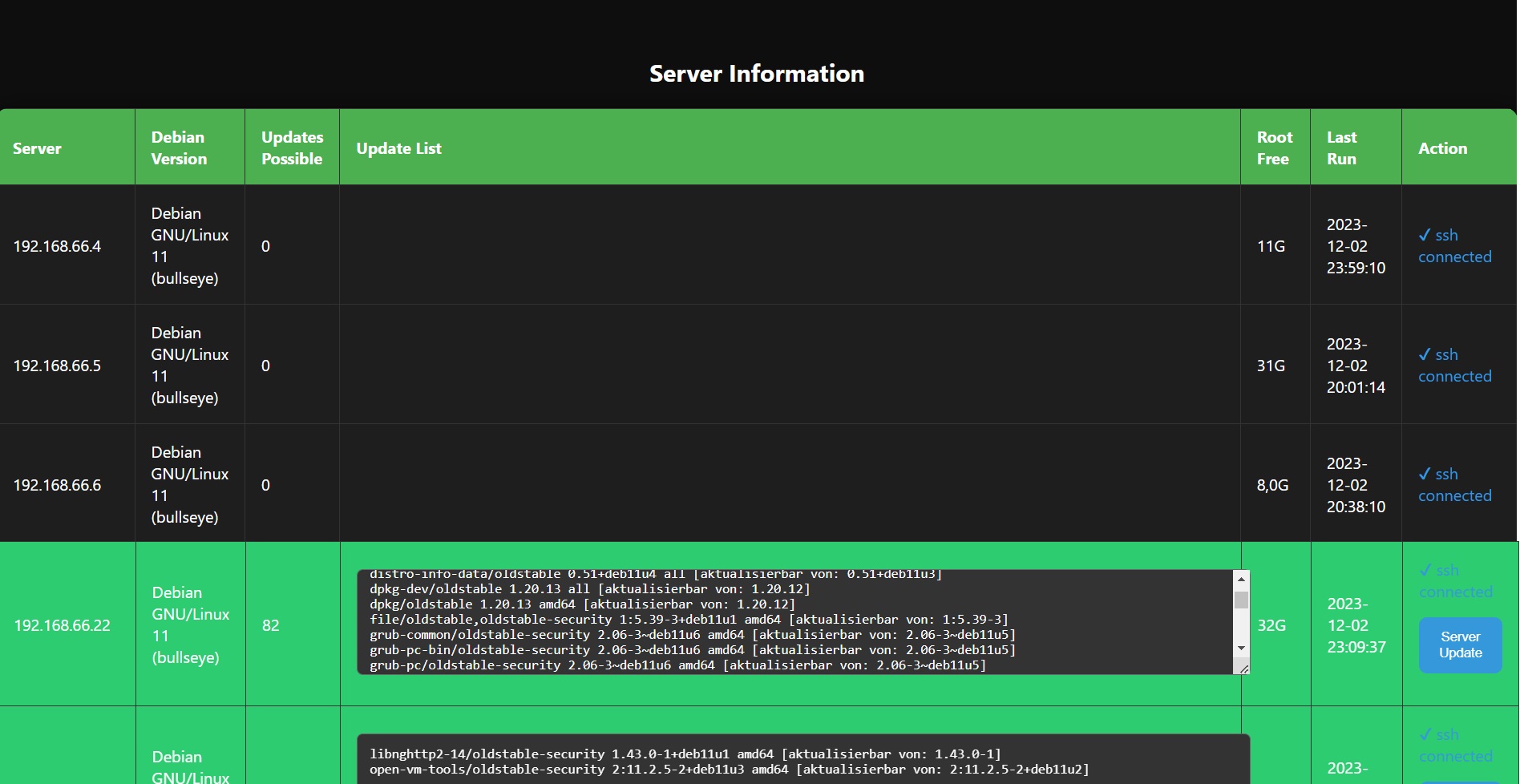
- Nun kann die erstellte Webseite (index.php) mit einem Browser aufgerufen werden.
- Jeder neue Satellit muss mit einem Klick auf den Button „connect-SSH“ zuerst verbunden werden.
- Danach kann er mit dem Button Update-Server aktualisiert werden.